
Valentine's Day promotion background
14.Feb - 13.Mar 2026

Valentine deal

AI UNLOCKED
For new and existing customers for 3 months
Integration logo
MultiTEL

MultiTEL

Ano ang MultiTEL?

Ang MultiTEL ay isang VoIP service provider na may cost-effective communication solutions. Nagbibigay sila ng serbisyo sa global scale, na may points of presence sa lahat ng kontinente. Bukod sa worldwide coverage, ang MultiTEL ay nag-aalok din ng [analytics](/features/analytics-overview/ “Boost your customer support with LiveAgent’s analytics overview! Track performance, filter metrics, and improve efficiency. Free 30-day trial!’) tools na maaaring gamitin para sa pag-track ng inbound at outbound calls at text message volumes.

Paano mo magagamit ang MultiTEL sa LiveAgent?

Ang MultiTEL ay isa sa mga VoIP providers na sinusuportahan ng LiveAgent help desk software. Maaari mong piliin ito bilang iyong provider ng telecommunication services. Ang kailangan mo lang gawin ay makakuha ng iyong call number, ikonekta ito sa LiveAgent at magsimulang gumawa at makatanggap ng [customer calls](/call-center-software/ “Discover LiveAgent’s top call center software for 2025! Omnichannel support, VoIP, IVR, call routing & more. Start your 30-day free trial now!’) bilang bahagi ng iyong multi-channel help desk.

Ang LiveAgent [call center features](/features/ “Explore LiveAgent’s powerful multi-channel help desk features—ticketing, live chat, call center, and more. Boost support efficiency today!’) ay makakatulong sa iyo sa customer call management. I-route ang mga calls sa tamang agents , lumikha ng [custom IVR trees](/features/ivr-interactive-voice-response/ “Effortlessly manage calls with LiveAgent’s customizable IVR system. Improve customer satisfaction, reduce wait times & streamline support!’) upang tulungan ang iyong mga customers na maabot ang specific departments , gumawa ng video calls .

Kung gusto mong malaman pa, panoorin ang video sa ibaba upang makita kung paano gumagana ang LiveAgent call center sa practice.

Thumbnail for Call Center Software Demo LiveAgent

Ano ang mga benepisyo ng paggamit ng MultiTEL?

  • Worldwide coverage
  • Global phone numbers
  • Isang kapaki-pakinabang na seleksyon ng features
  • Call at text message analytic tools

Libre ba ang MultiTEL integration sa LiveAgent?

Ang [integration](/integrations/ “Discover how LiveAgent’s extensive integrations, plugins, and apps can enhance your help desk software and boost customer satisfaction. Explore popular integrations with VoIP partners like Hero, Orion, and Redspot, plus CRM, eCommerce, and more. Visit us to streamline your communication and elevate your business with easy integration guides.’) ay kasama na sa isang LiveAgent plan at hindi mo kailangang magbayad ng anumang karagdagang bayad. Kapag mayroon ka na ng access sa parehong MultiTEL at LiveAgent, maaari mong simpleng ikonekta ang iyong MultiTEL number sa aming help desk at magsimulang tumawag.

Paano mo mai-integrate ang MultiTEL sa LiveAgent?

Ang MultiTEL ay built-in na sa LiveAgent, ang kailangan mo lang gawin ay idagdag ang iyong MultiTEL number at gumawa ng simple configuration. Sundin ang gabay sa ibaba upang matuto kung paano kumpletuhin ang proseso.
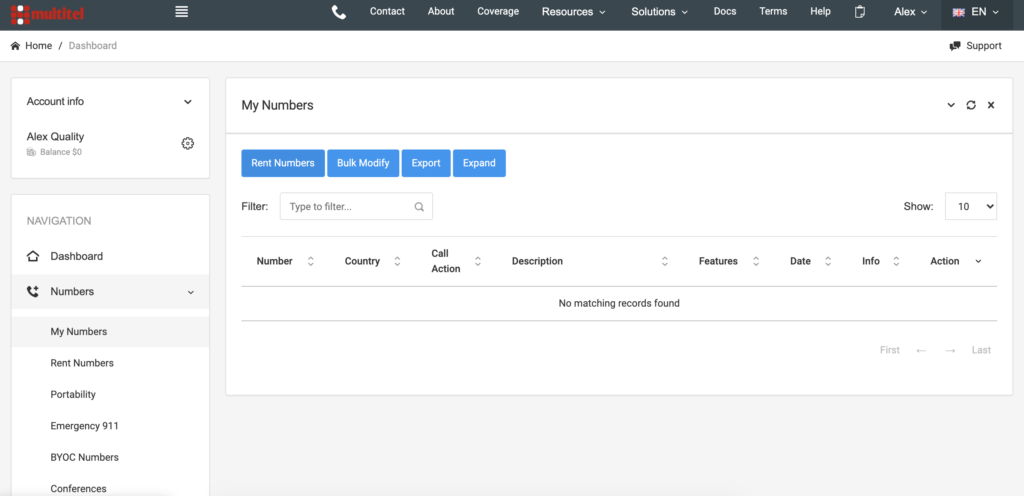
  • Pumunta sa MultiTEL website at lumikha ng account. Ito ay libre. Pagkatapos mong mag-log in, pumunta sa iyong dashboard at i-click ang Numbers > My Numbers at piliin ang Rent Numbers. Punan ang contact form at makikipag-ugnayan sa iyo ang MultiTEL. Kapag nakatanggap ka na ng iyong number mula sa MultiTEL, pumunta sa iyong LiveAgent account.
MultiTEL dashboard with number options
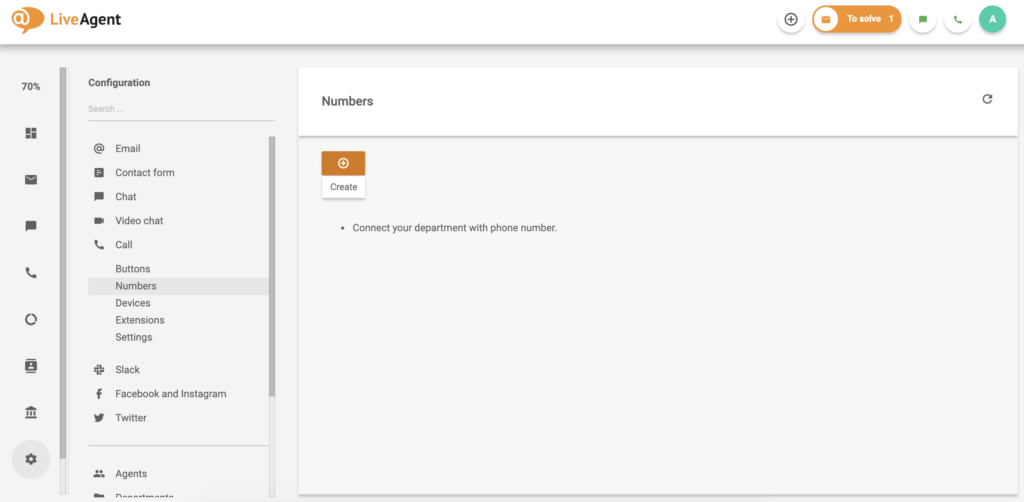
  • Sa iyong LiveAgent dashboard pumunta sa Configuration > Call > Numbers. I-click ang create button sa tuktok upang idagdag ang iyong MultiTEL number sa system. Pagkatapos piliin ang MultiTEL mula sa listahan ng providers.
LiveAgent call number screen with the option to create a new number
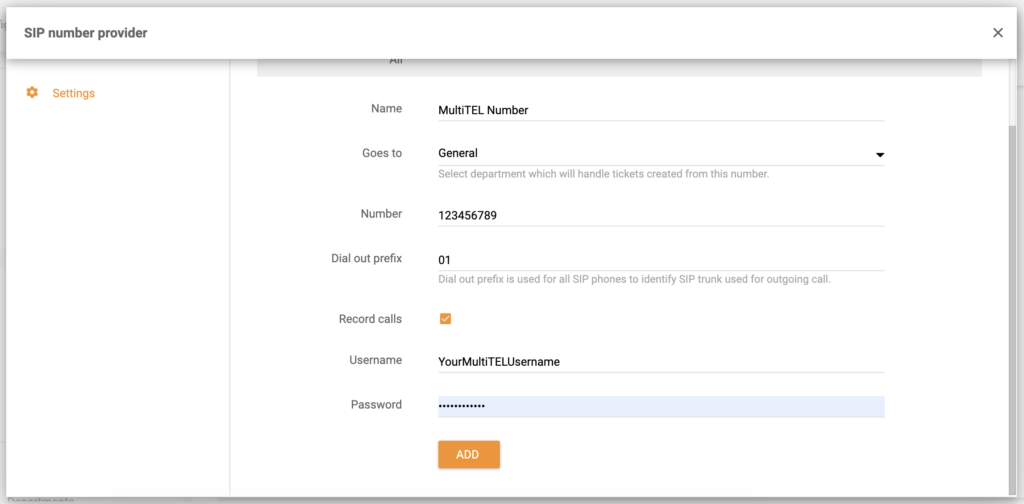
  • Ngayon magbigay ng iyong MultiTEL username, password at number. Piliin ang department kung saan dapat pumunta ang mga calls, pangalanan ang number at piliin kung gusto mo bang i-record ang mga calls. I-click ang Add at tapos na.
MultiTEL number configuration screen in LiveAgent

Ang iyong MultiTEL number ay konektado na sa LiveAgent at maaari mong sagutin ang customer calls. Bukod sa call center, ang LiveAgent ay nag-aalok ng malawak na hanay ng help desk tools sa isang ticketing system – emails, [live chat](/features/live-chat-features/ “Boost engagement with LiveAgent’s real-time live chat! Customize chat buttons, send proactive invites, and integrate seamlessly. Try free today!’), [customer portal](/features/customer-portal/ “Explore LiveAgent’s customer portal to enhance your business’s customer service with 24/7 support, a knowledge base, feedback forums, and ticket submission. Improve satisfaction, cut support costs, and boost website traffic. Start a free trial today and transform your customer service experience!’), o [social media](/features/social-media-help-desk/ “Discover how LiveAgent’s social media help desk features can transform your customer service by integrating platforms like Facebook, Twitter, and WhatsApp into a single inbox. Enhance efficiency with customizable SLAs, departments, and third-party integrations. Elevate customer satisfaction and unlock sales opportunities with streamlined social media interactions.’) tulad ng Facebook , Instagram , at Twitter .

Matuto pa tungkol sa LiveAgent sa aming [features page](/features/ “Explore LiveAgent’s powerful multi-channel help desk features—ticketing, live chat, call center, and more. Boost support efficiency today!’) o panoorin ang video sa ibaba upang makakuha ng buong tour ng aming toolset.

Thumbnail for LiveAgent Product Tour

Frequently asked questions

Ano ang MultiTEL?

Ang MultiTEL ay isang VoIP provider na nag-aalok ng global numbers, iba't ibang calling features at analytic tools para sa calling at text messaging.

Libre ba ang MultiTEL integration sa LiveAgent?

Ang integration ay libre bilang bahagi ng aming all-inclusive LiveAgent plan at walang karagdagang bayad

Maaari ko bang i-integrate ang MultiTEL sa LiveAgent?

Ang MultiTEL numbers ay madaling maidagdag sa LiveAgent salamat sa aming built-in feature. Narito kung paano ito gawin: Buksan ang LiveAgent at pumunta sa Configuration > Call > Numbers. Lumikha ng bagong number at piliin ang MultiTEL mula sa listahan ng providers. Idagdag ang iyong number at iba pang detalye at i-click ang Add.

Back to Mga Integrations Try for Free

Lumikha ng iyong sariling call center ngayon!

Subukan ang LiveAgent gamit ang aming libre 30-day trial at magbigay ng mas mahusay na phone support.

Learn more

RingCentral
RingCentral

RingCentral

Ang RingCentral ay isang call center software na nag-aalok ng voice, fax, text, conferencing, at web meetings. Ito ay nagsasama sa LiveAgent sa pamamagitan ng Z...

3 min read
SendMyCall
SendMyCall

SendMyCall

Ang SendMyCall ay isang VoIP provider na nag-aalok ng virtual at toll-free numbers, PBX systems, at call management. Ito ay sumasama sa LiveAgent para sa mahusa...

3 min read
Suporta sa Helpdesk
Suporta sa Helpdesk

Suporta sa Helpdesk

Tuklasin ang mga essentials ng helpdesk support gamit ang LiveAgent, isang versatile na software na nag-aalok ng ticket management, automation, at multichannel ...

2 min read
Customer support Help Desk software +1

You will be in Good Hands!

Join our community of happy clients and provide excellent customer support with LiveAgent.
Post Affiliate Pro Dashboard - Campaign Manager Interface